
Score breakdown
Updated Aug 28, 2026QuillBot made its name as the go-to paraphrasing tool, and has grown into a cheap all-round writing helper. We tested its paraphrasing, summarizing, and grammar features.
What is QuillBot?
QuillBot is a writing tool centered on paraphrasing and summarizing, with grammar checking and a citation generator added. It is popular with students and writers who need to reword, condense, or polish text affordably.
What QuillBot does well
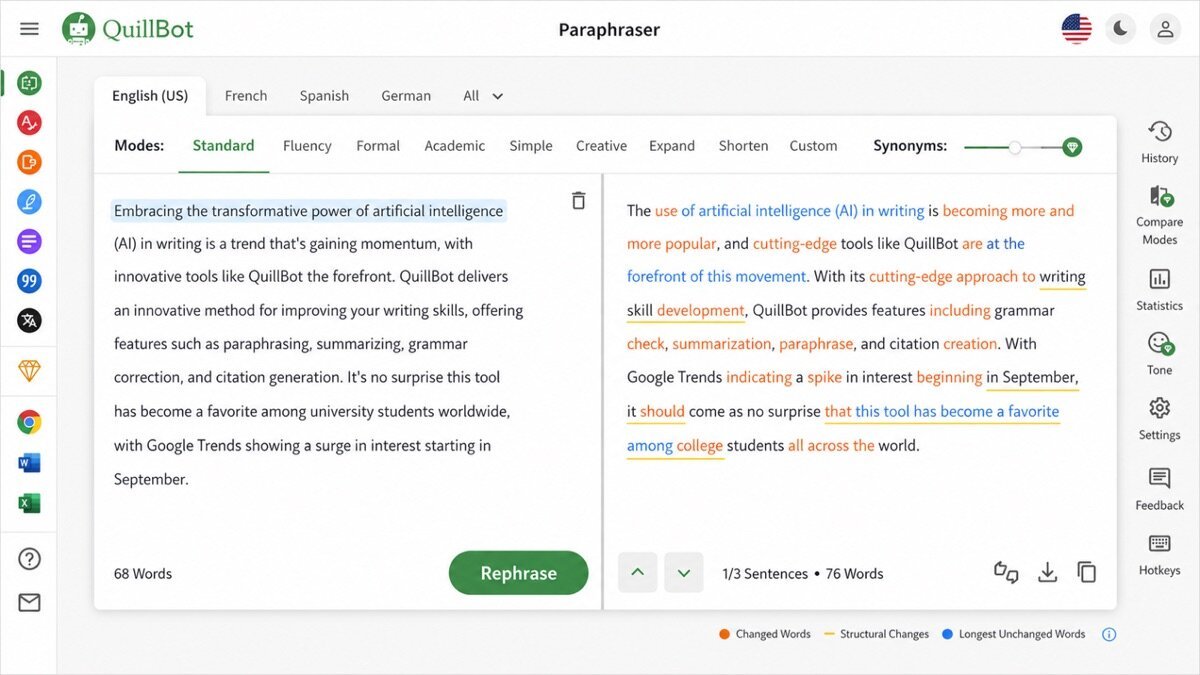
Best-in-class paraphrasing
Multiple rewrite modes produce natural rephrasing — the feature QuillBot is known for and still leads on.
Summarizing
It condenses long text into key points quickly, handy for research and notes.
Cheap all-rounder
Grammar checking and a citation tool round it out at a price well below premium editors.
Where it falls short
Its grammar checking is decent but not as deep as Grammarly or ProWritingAid, and heavy paraphrasing without editing can read awkwardly. It is a rewriting specialist first, editor second.
QuillBot hands-on
Paraphrasing was genuinely the best we tested — natural, with useful mode options. Summarizing was quick and accurate. Grammar checking was fine but secondary. For rewording and condensing on a budget, QuillBot is excellent.
How QuillBot scored on our rubric
QuillBot pricing
QuillBot has a capable free tier and Premium from around $10/month (cheaper billed annually). For paraphrasing and summarizing at that price, it is outstanding value.
Who should (and shouldn’t) use QuillBot
Buy it if you frequently reword, summarize, or polish text and want it cheaply.
Skip it if you need deep grammar/style editing — Grammarly or ProWritingAid do more.
QuillBot alternatives
Full ranking: best AI grammar checkers.
What’s new in QuillBot for 2026
QuillBot has widened from a paraphraser into a small writing suite. Its paraphrase modes are more natural, the grammar checker is stronger, and it has added an AI content detector, a translator, and an expanded summarizer, all reachable in the browser and Word. It remains the go-to for rewording, now with more surrounding tools at the same low price.
Getting the most out of QuillBot
- Use it primarily for rewording and condensing — its core strength.
- Switch paraphrase modes (standard, fluency, formal) to fit the context.
- Summarize long research or articles into key points fast.
- Pair it with a grammar tool like Grammarly for deeper checking.
- Students: use the citation generator, and reword ethically, not to disguise copied work.
QuillBot in practice: rewording and summarizing
We fed QuillBot clunky sentences and long research, and it excelled at both — the paraphrasing was the most natural we tested, with genuinely useful mode options, and the summarizer condensed a long article into clean bullet points in seconds. Grammar checking was fine but clearly secondary. For rewording and digesting text on a budget, QuillBot is hard to beat.
QuillBot for different use cases
- Students: Paraphrasing, summarizing, and citations for study.
- Rewording & editing: Cleaner phrasing for clunky sentences.
- Research: Summarizing long sources into key points.
- ESL writers: More natural phrasing and fluency fixes.
How QuillBot compares
| Tool | Best for | Starts at | Our score |
|---|---|---|---|
| QuillBot | Paraphrasing | $10/mo | 8.3 |
| Grammarly | Everyday grammar | $12/mo | 9.1 |
| Wordtune | Slick rewriting | $10/mo | 8.2 |
Is QuillBot worth it?
At around $10/month with a capable free tier, QuillBot is excellent value for anyone who reword or summarizes often. It is a rewriting specialist, not a full grammar suite, so pair it with Grammarly if you need deep checking too — but for its core job, few tools give you more for the price.
QuillBot FAQ
The verdict
QuillBot is the best affordable paraphrasing and summarizing tool, with grammar checking bundled in. It is not a deep editor, but for rewording on a budget it is hard to beat. We score it 8.3 out of 10.