
Score breakdown
Updated Aug 28, 2026Grammarly is the default grammar checker for millions, and for good reason. We tested it across email, docs, and long-form to see whether it still leads in 2026. Short answer: for everyday correctness and clarity, nothing is more seamless.
What is Grammarly?
Grammarly is a real-time writing assistant that checks grammar, spelling, clarity, and tone across the web and desktop apps. A free tier covers the basics; Premium adds clarity rewrites, tone adjustments, and more. It suits everyone from students to professionals.
What Grammarly does well
Real-time everywhere
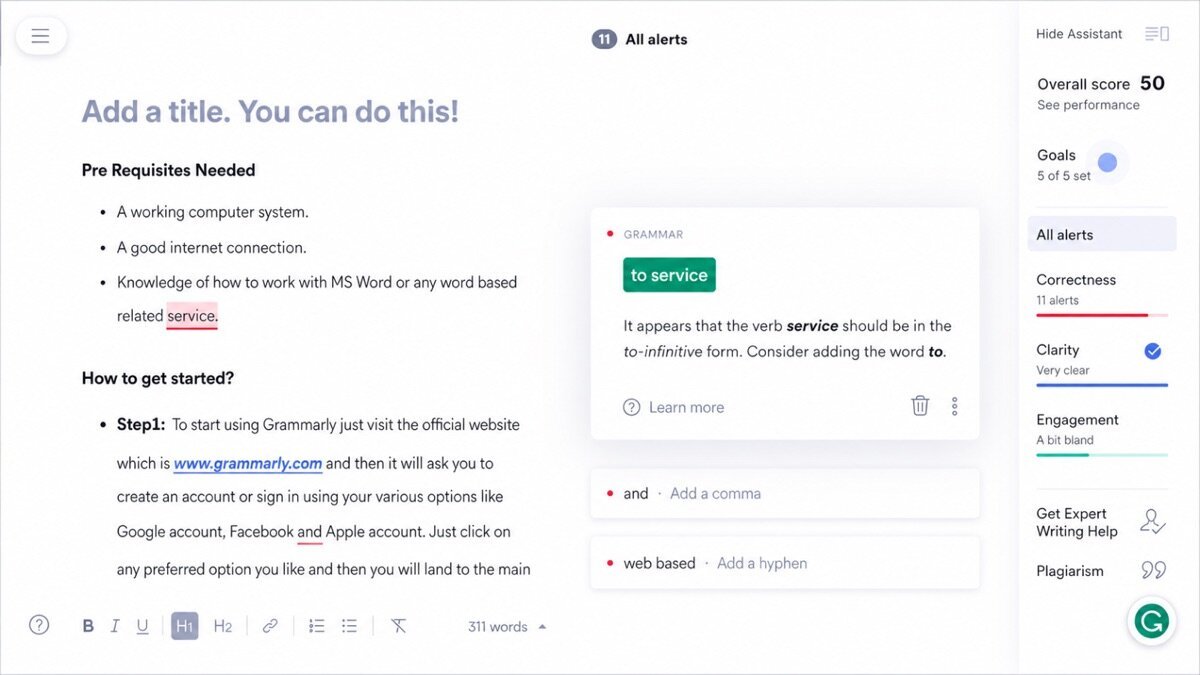
Grammarly works in your browser, email, and apps, catching issues as you type — the most seamless experience in the category.
Clarity and tone
Premium goes beyond grammar to suggest clearer phrasing and flag tone, which genuinely improves everyday writing.
Generous free tier
The free version handles core grammar and spelling well enough for many users, which is rare among premium tools.
Where it falls short
It is not built for deep manuscript editing (ProWritingAid does more there), and Premium is pricier than paraphrasing-focused rivals. Over-reliance on its rewrites can also flatten your voice if you accept every suggestion.
Grammarly hands-on
Across emails and drafts, Grammarly caught issues instantly and its clarity suggestions tightened sentences well. On a long manuscript it was helpful but less detailed than a dedicated editing tool. For everyday writing correctness, it remains the smoothest option we tested.
How Grammarly scored on our rubric
Grammarly pricing
Grammarly has a solid free plan, with Premium around $12/month (billed annually) and Business tiers for teams. For everyday writers, the free tier is enough; heavy or professional writers get real value from Premium.
Who should (and shouldn’t) use Grammarly
Buy it if you want seamless, everywhere grammar and clarity help for everyday writing.
Skip it if you need deep manuscript/style analysis — ProWritingAid goes further.
Grammarly alternatives
- ProWritingAid — deeper style and manuscript reports. Review.
- QuillBot — cheaper, paraphrasing-focused. Review.
Full ranking: best AI grammar checkers.
What’s new in Grammarly for 2026
Grammarly has evolved from a checker into a writing assistant. GrammarlyGO adds generative AI that drafts, rewrites, and replies in your context, tone detection has become more nuanced, and it now works across even more apps and platforms. Business tiers gained style guides and brand tones for teams. Crucially, the real-time correctness that made it a default is still the smoothest in the category.
Getting the most out of Grammarly
- Use the free tier for everyday grammar and spelling — it covers a lot.
- Upgrade to Premium for clarity rewrites, tone, and full-sentence suggestions.
- Use GrammarlyGO to draft or rephrase, then edit for your voice.
- Set document goals (audience, formality, intent) so suggestions fit.
- Do not accept every suggestion — keep the ones that help, reject the ones that flatten you.
Grammarly in practice: everyday writing
Across a week of emails, docs, and drafts, Grammarly caught issues the instant we typed them and its clarity suggestions quietly tightened clunky sentences. On a longer piece it helped, though it did not dig as deep as a dedicated manuscript tool. The standout was how invisible it is — it just works everywhere you write, which is exactly why it remains most people’s default.
Grammarly for different use cases
- Everyday email & docs: Real-time correctness wherever you type.
- Students: Catch errors and improve clarity on essays.
- Professionals: Polished, on-tone workplace writing.
- Non-native speakers: Confidence that grammar and phrasing read naturally.
How Grammarly compares
| Tool | Best for | Starts at | Our score |
|---|---|---|---|
| Grammarly | Everyday grammar | $12/mo | 9.1 |
| ProWritingAid | Manuscript editing | $12/mo | 8.6 |
| QuillBot | Paraphrasing | $10/mo | 8.3 |
Is Grammarly worth it?
Grammarly’s free tier is genuinely useful, which makes it easy to recommend to anyone. Premium at around $12/month (billed annually) is worth it for professionals and heavy writers who benefit from clarity, tone, and generative help. If your needs are basic, the free version alone may be all you require — rare among premium tools.
Grammarly FAQ
The verdict
Grammarly remains the best everyday grammar and clarity checker — seamless, everywhere, and genuinely helpful. It is not a manuscript editor, but for day-to-day writing it is the one to beat. We score it 9.1 out of 10.