AI product photography can turn a plain phone snapshot into a studio-quality shot — no photographer, lighting rig, or set required. Here is how to create product photos with AI that look professional while staying true to what you actually ship.
1. Start with a clean source image
AI enhances a photo, it cannot rescue a terrible one. Begin with a sharp, well-lit shot of the product on a plain background so the tool has an accurate subject to work from.
2. Choose the scene and style
Decide the look before you generate: crisp studio white, a lifestyle setting, or a contextual scene. Describe the surface, lighting, and mood you want so the result matches your brand.
3. Generate with a product-focused tool
Use a tool built for product photography, like Rewarx, which preserves your actual product while replacing the background or scene. General image generators often distort the product, which is exactly what you cannot afford here.
4. Keep the product accurate
The item in the image must match what the customer receives — regenerate anything that alters the logo, color, shape, or proportions. Accuracy protects trust and cuts returns and disputes.
5. Match each platform
Generate variants per channel: a clean white background for Amazon, lifestyle and contextual shots for social and Etsy. One image rarely fits every marketplace’s rules and audience.
6. Retouch and export
Do final tweaks to shadows and reflections so the product sits naturally in the scene, then export at the resolution each marketplace requires. Sharp, correctly sized images look more trustworthy.
7. Generate a full set per product
Buyers want several angles, so produce a consistent set — hero shot, close-up detail, in-use, and scale — for each product rather than a single image. A complete gallery converts better and reduces the questions and returns that come from uncertainty.
Tools we recommend for this
For product-accurate shots we use Rewarx; for commercially safe backgrounds inside Adobe, Adobe Firefly works well. See the full ranked list in our best AI image generators guide.
Common mistakes to avoid
A bad source image. AI cannot fix a blurry, badly lit photo. Start clean.
An altered product. Wrong color or a warped logo misleads buyers and drives returns. Keep it accurate.
One image for every platform. Marketplaces have different rules and audiences. Tailor per channel.
Ignoring commercial licensing. Confirm the tool’s output is cleared for commercial use — Firefly is designed to be.
Over-editing the scene. Unnatural shadows, reflections, or a floating product look fake. Keep the composite believable.
How to create product photos with AI: FAQ
Can AI create realistic product photos?
Yes — product-focused tools produce studio-quality scenes while keeping your real product intact. The key is starting from a clean source image.
Which AI tool is best for product photos?
Rewarx for product-accurate shots; Adobe Firefly for commercially safe backgrounds inside the Adobe suite. See our best AI image generators guide for more.
Are AI product photos allowed on Amazon?
Yes, provided the image accurately represents the product you sell. Never alter the item itself, and follow each marketplace’s image rules.
Do I still need a real product photo to start?
Yes — a clean, accurate source photo gives the AI the correct product to work from. AI restyles the scene; it should not invent the product.
The bottom line
AI product photography is a major cost saver for sellers, but the product must stay truthful in every shot. Get accuracy right and you win customer trust while cutting returns.
Rewarx Studio and Midjourney both make images with AI — but they are built for opposite jobs. Rewarx is a purpose-built product-photography studio for online sellers; Midjourney is the leading creative art generator. We tested both to answer one practical question: if you need images for your store, which should you use?
Quick verdict
For e-commerce product images — catalog shots, mockups, model and lifestyle scenes — Rewarx wins. For original artwork, concepts and illustration, Midjourney wins. They are not really rivals; they solve different problems.
At a glance
Tool
Best for
Starts at
Our score
Rewarx Studio
E-commerce product photography
Free / $9.90 1st mo
8.3
Midjourney
Creative art & concepts
$10/mo
9.0
Round 1: Product-image quality — Rewarx
On raw artistic quality, Midjourney is unmatched — its images are the most striking of any generator. But for a product shot, that is not the goal: you need your product, rendered accurately, on a clean background or in a believable scene. That is exactly what Rewarx is tuned for — material physics, reflections, and lighting across 20-plus categories — while Midjourney will happily invent a similar-looking product that is not yours. For catalog accuracy, Rewarx takes the round.
Round 2: Ease of use — Rewarx
Midjourney runs on prompt-craft: you learn its syntax and iterate. Rewarx is intent-based and one-click — upload a photo, pick an outcome, generate. For a busy seller who wants a white-background shot and a lifestyle scene without learning prompt engineering, Rewarx is far faster to a usable result.
Round 3: Features for sellers — Rewarx
This is not close for e-commerce. Rewarx bundles eight purpose-built studios — AI photography, model shots, ghost mannequin, mockups, group shots, listing builders and ad posters — plus batch processing for hundreds of SKUs and short product video. Midjourney is a single, superb art engine with none of that commerce tooling.
Round 4: Pricing & value — tie
Midjourney has no free tier and starts around $10/mo. Rewarx offers a free trial (10 credits) and a discounted first month, then scales by credits. Both are fairly priced for what they do; Rewarx edges slightly ahead on trial access, Midjourney on raw output per dollar for art. Confirm current pricing on each site before buying.
Who should choose Rewarx Studio
Choose Rewarx if you sell physical products and need consistent, accurate catalog images — on Etsy, Amazon, Shopify or eBay — at volume, without a photographer.
Choose Midjourney if you want the highest-quality original artwork, concepts, illustration or moodboards — where inventing a beautiful image, not reproducing a real product, is the point.
It can create product-like images, but it invents them — it cannot reliably reproduce your exact product. For real catalog shots you need a product-photography tool like Rewarx.
Is Rewarx better than Midjourney?
For e-commerce product images, yes. For original art, no — Midjourney leads. They are built for different jobs.
Which is cheaper?
Rewarx has a free trial and a discounted first month; Midjourney is paid-only from around $10/mo. Check current pricing on each site.
The bottom line
This is not a fight — it is a fork in the road. If your images are products, use Rewarx Studio: it is built for accurate, on-brand catalog shots at scale. If your images are art, use Midjourney: nothing matches its quality. Many sellers will only ever need Rewarx.
Rewarx Studio is an AI product-photography platform built for one job: turning raw product snapshots into clean, catalog-ready commercial images — and doing it in bulk. Instead of a general image generator you have to coax with prompts, it packages eight purpose-built studios around e-commerce photography. We looked at what it does, where it fits, and who should actually use it.
Rewarx Studio is an AI photography suite aimed at online sellers. You upload a basic product photo and it produces professional shots — studio lighting, lifestyle scenes, model shots, mockups, even short promo video — without a camera, a set, or a photographer. Its pitch is an “intent-based” one-click flow: pick the result you want rather than engineer a prompt, which drops the learning curve from the half-hour of prompt-wrangling a general model needs to a couple of minutes.
What’s inside: eight studios
Rewarx bundles specialized tools rather than one catch-all generator:
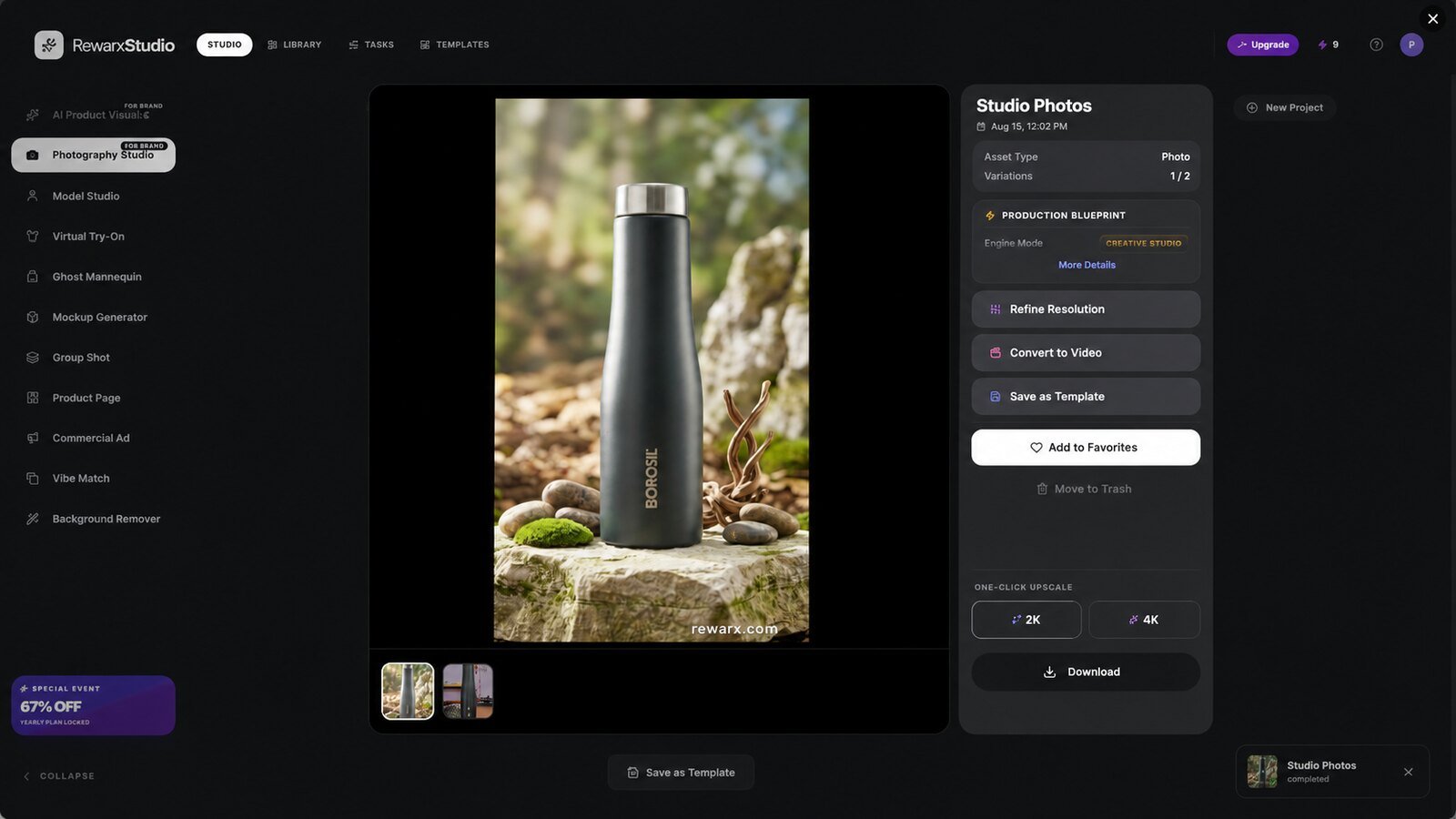
AI Photography Studio — virtual studio with lighting and texture control.
AI Lookalike Creator — match the aesthetic of a reference photo.
AI Model Studio — place products on professional human models.
AI Ghost Mannequin — the invisible-mannequin effect for apparel.
AI Mockup Generator — apply artwork or patterns onto 3D items.
AI Group Shot Studio — multi-product scenes.
AI Product Page Builder — assemble listing assets.
AI Commercial Ad Poster — marketing graphics and promo posters.
What Rewarx does well
Industry-tuned realism
Rewarx says its models are fine-tuned for the material physics and lighting of 20-plus categories — electronics, cosmetics, fashion, jewelry, beverages and more. For product shots that specialization matters: generic image tools often get reflections, glass, and metal wrong, and this is where a purpose-built tool earns its place.
Batch at scale
The workflow is built for catalogs, not one-off hero images — it advertises processing well over a hundred SKUs in a minute. For a store with hundreds of listings, that is the difference between a weekend and a coffee break.
One-click, intent-based workflow
Choosing an outcome instead of writing prompts is the right call for the target user. A busy seller doesn’t want to learn prompt-craft; they want a white-background shot and a lifestyle scene, fast.
From images to product video
Turning a still into a short cinematic clip is a genuine bonus for marketplaces and ads that increasingly reward video, without touching a separate editor.
Where it falls short
It is narrow by design — this is product photography, not a general creative image tool, so it won’t replace Midjourney for art or concept work. Output quality can vary with tricky materials and unusual products, so expect some retries. It’s also a newer platform with a shorter track record, and its heaviest use needs the higher credit tiers, which climb toward agency pricing. Treat the first few generations as a test of whether it handles your specific catalog.
Rewarx is credit-based and starts with a free trial (10 credits) so you can test it before paying. Paid plans begin with Starter — a promotional $9.90 for a new user’s first month, then about $29.90/mo — with 100 credits, no watermarks, the Commercial Poster Studio and e-commerce asset sets (~100 standard photos, ~33 in 4K, or 5 cinematic videos). Growth ($54.90/mo, 200 credits) adds bulk-generation optimization; Scale ($129.90/mo, 500 credits) adds the batch template studio and multi-SKU tools for high-volume sellers; and Agency ($249.90/mo, 1,000 credits) adds API access, multi-user accounts, a white-label delivery portal and priority GPU processing. Yearly billing saves ~17%, and there’s a money-back guarantee, so trialing it is low-risk. Confirm current pricing on their site and run a small batch first — for a store replacing photographer fees, even the Starter tier pays for itself quickly.
Buy it if you sell physical products on Etsy, Amazon, Shopify, or eBay and need consistent, professional catalog images at volume without hiring a studio.
Skip it if you want a general creative image generator for art, concepts, or marketing illustration — a tool like Midjourney or Adobe Firefly fits that better.
Rewarx for different use cases
Marketplace sellers: white-background and lifestyle shots that meet Amazon and Etsy standards.
Apparel & accessories: ghost-mannequin and on-model shots without a photoshoot.
Print-on-demand: mockups that apply artwork onto real-looking products.
Ads & promos: commercial posters and short product video for social.
If product photography is a real cost or bottleneck in your store, Rewarx is worth a serious trial — it is purpose-built for exactly that job, and the batch workflow plus industry tuning are hard to match with a general image tool. Just validate quality on your own products and confirm the current pricing before you commit. For creative or non-product image work, look elsewhere.
Rewarx FAQ
What is Rewarx Studio used for?
Turning raw product photos into professional e-commerce images — studio shots, model and mockup shots, and short product video — in bulk, without a photographer.
Is Rewarx better than Midjourney?
For product photography, yes — it is purpose-built and batch-ready. For creative art and concepts, Midjourney is the better tool. They solve different problems.
Who is Rewarx for?
E-commerce sellers on Etsy, Amazon, Shopify, and eBay, and any business that needs consistent catalog images at volume.
Does Rewarx do video?
Yes — it can turn product images into short cinematic promo clips for ads and social.
The verdict
Rewarx Studio is a focused, capable AI photography suite for online sellers — not a general image generator, and better for it. Industry tuning and batch speed are its edge; opaque pricing and a short track record are the caveats. We score it 8.3 out of 10.
Hands-on look at NovelistAI: an all-in-one AI writing platform for novels, stories, and interactive gamebooks. Features, who it’s for, pricing and verdict.