
Score breakdown
Updated Aug 28, 2026InVideo AI takes the boldest approach: type a prompt describing your video and it generates a complete draft — footage, voiceover, captions, and all. We tested it on social and explainer content.
What is InVideo AI?
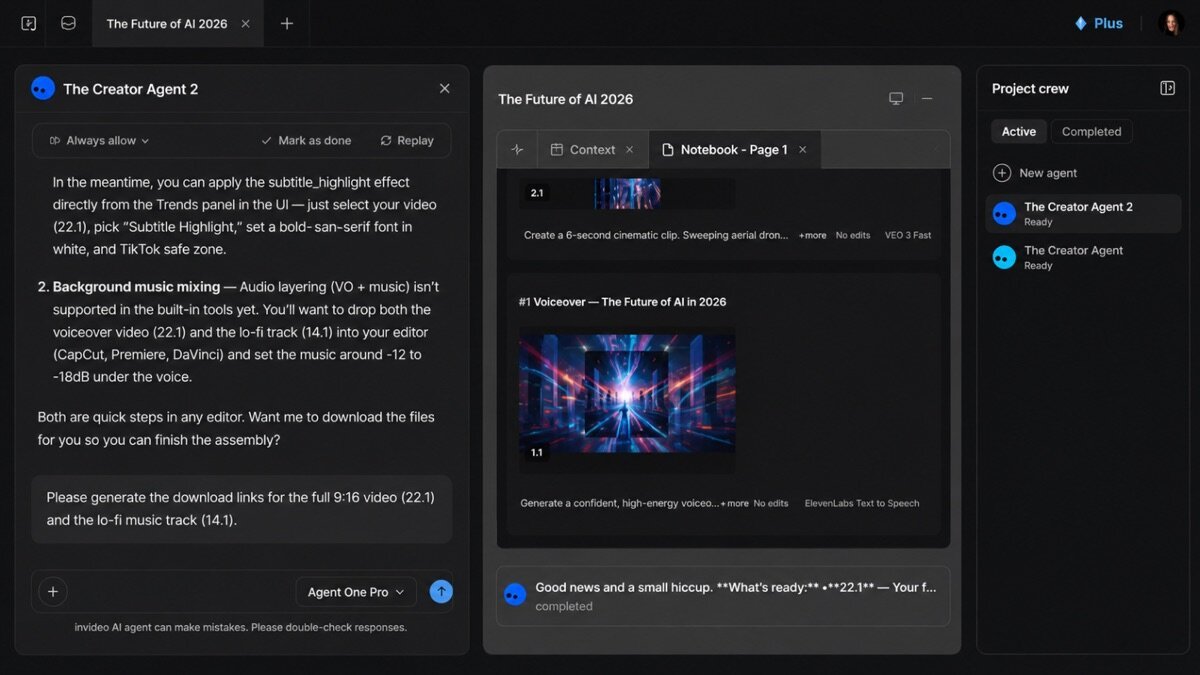
InVideo AI is a text-to-video generator. From a prompt (or a script/URL) it assembles stock footage, an AI voiceover, music, and captions into a full video, which you then refine with text commands or a timeline. It targets creators making social and faceless video fast.
What InVideo AI does well
Prompt-to-video
Describe the video you want and it produces a complete first draft — the most automated workflow we tested.
Text-command editing
Refine the video by typing instructions (“make the intro shorter”) — a genuinely novel editing approach.
Voiceover, music & captions
It bundles AI voiceover, music, and auto-captions, so a rough video is done in one pass.
Where it falls short
First drafts still need editing, footage can feel generic, and complex or precise edits are harder than in a real editor. It is fast, not fully hands-off.
InVideo AI hands-on
From a one-paragraph prompt, InVideo AI produced a complete, watchable social video in minutes — impressive. Text-command tweaks worked well for coarse changes; fine edits needed the timeline. For fast faceless video from an idea, it is remarkable.
How InVideo AI scored on our rubric
InVideo AI pricing
InVideo AI has a free tier and paid plans from around $25/month, scaling generation minutes and removing watermarks. For creators producing social video at volume, it is good value.
Who should (and shouldn’t) use InVideo AI
Buy it if you want to generate faceless social or explainer videos from a prompt, fast.
Skip it if you need precise creative control or original footage — a traditional editor fits better.
InVideo AI alternatives
Full ranking: best AI video tools.
What’s new in InVideo AI for 2026
InVideo AI has improved generation quality, added more natural voices, and refined its text-command editing so you can reshape a video by typing instructions. A bigger stock and template library and early character-consistency features make outputs more usable, pushing it further ahead as the leading prompt-to-video generator.
Getting the most out of InVideo AI
- Give a detailed prompt — audience, tone, length, and key points — for a better first draft.
- Refine with text commands like “shorten the intro” or “change the music”.
- Paste your own script when you want tighter control over the message.
- Swap generic stock clips for stronger, more specific footage.
- Add branding and captions before exporting for social.
InVideo AI in practice: a prompt to a full video
From a single paragraph prompt, InVideo AI generated a complete social video — footage, voiceover, music, and captions — in minutes. Coarse edits via text commands worked well (“make it punchier, shorten to 60 seconds”); fine, precise changes still needed the timeline. The footage felt a touch generic, but going from an idea to a watchable draft this fast is genuinely useful for faceless content at volume.
InVideo AI for different use cases
- Faceless social video: Generate shorts and reels from a prompt, no filming.
- Explainers: Quick draft explainers to refine.
- Ads: Fast ad variations for testing.
- Repurposing: Turn a script or idea into video at speed.
How InVideo AI compares
| Tool | Best for | Starts at | Our score |
|---|---|---|---|
| InVideo AI | Prompt-to-video | $25/mo | 8.3 |
| Pictory | Script-to-video | $25/mo | 8.4 |
| Descript | Editing talking video | $16/mo | 9.0 |
Is InVideo AI worth it?
At around $25/month with a free tier, InVideo AI is good value for creators producing faceless or social video at volume — the speed from idea to draft is its selling point. Drafts need polish and footage can be generic, so if you want precise, original video you will still reach for a full editor; for fast output, it delivers.
InVideo AI FAQ
The verdict
InVideo AI is the best prompt-to-video generator for producing faceless social content fast. Drafts need polish, but going from idea to watchable video in minutes is genuinely powerful. We score it 8.3 out of 10.