
Score breakdown
Updated Aug 28, 2026Descript reinvented editing by letting you edit media like a document: change the transcript, change the video. We tested it on podcast and talking-head content.
What is Descript?
Descript is an AI-powered video and audio editor built around transcription. You edit by editing text, remove filler words in one click, record your screen, and even use Overdub to fix audio with a synthetic version of your voice. It suits podcasters, YouTubers, and course creators.
What Descript does well
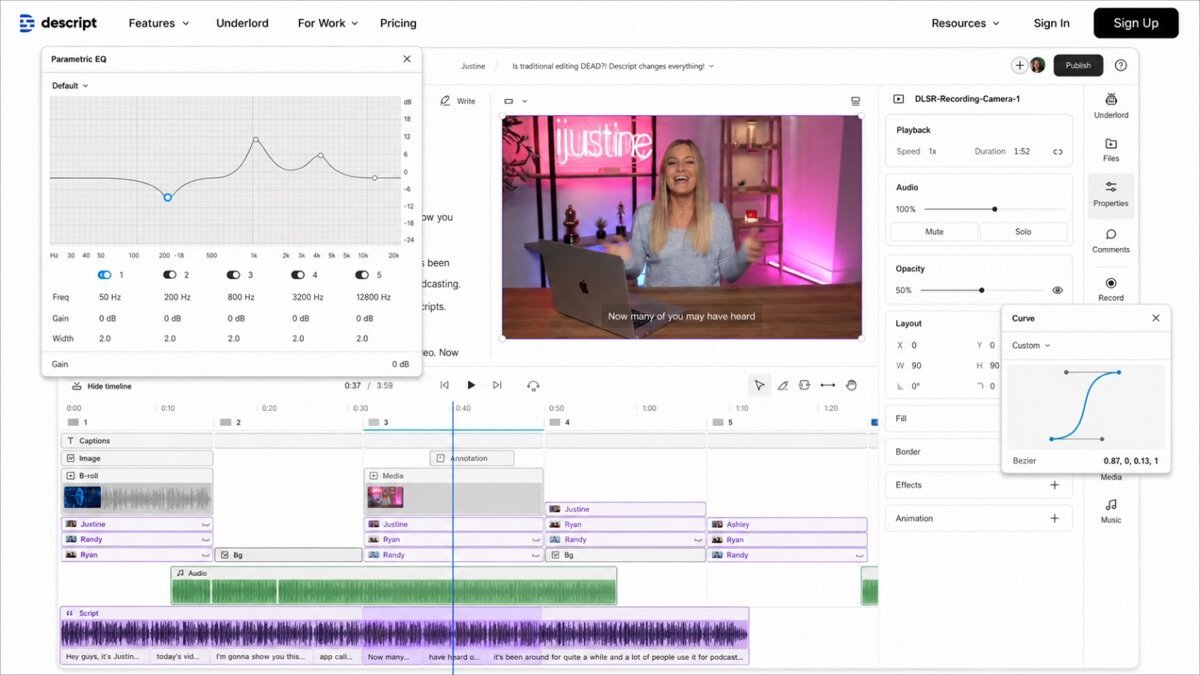
Edit by transcript
Delete a word in the transcript and it is cut from the video/audio — the fastest way to edit talking content we have used.
Filler-word removal
One click strips ums, ahs, and repeats across a whole recording — a huge time-saver.
Overdub & screen recording
Fix a misspoken line by typing it, and record your screen for tutorials, all in one app.
Where it falls short
It is built for talking-head and podcast content, not cinematic editing or motion graphics — heavy visual editors will still need a traditional NLE. Exports and effects are simpler than pro tools.
Descript hands-on
Editing a podcast by cutting text was genuinely transformative — what took an hour in a timeline took minutes. Filler removal cleaned up a rambly take instantly. For spoken-word content, Descript is the biggest workflow upgrade we tested.
How Descript scored on our rubric
Descript pricing
Descript has a free tier and paid plans from around $16/month, scaling transcription hours and features. For podcasters and video creators, the time saved easily justifies the cost.
Who should (and shouldn’t) use Descript
Buy it if you edit podcasts, talking-head videos, or tutorials and want a faster workflow.
Skip it if you need cinematic editing or motion graphics — a traditional editor fits better.
Descript alternatives
- Pictory — turn scripts into stock-footage video. Review.
- Synthesia — AI avatar presenter videos. Review.
Full ranking: best AI video tools.
What’s new in Descript for 2026
Descript has added Underlord, an AI assistant that can edit, add b-roll, write, and suggest cuts from plain instructions, plus improved multitrack editing, better Studio Sound for cleaning audio, AI green screen, and eye-contact correction. Overdub keeps improving too. The core transcript-based workflow is intact — the AI layer just makes it faster and more powerful.
Getting the most out of Descript
- Edit by deleting words in the transcript — the fastest way to cut talking content.
- Use one-click filler-word removal to clean up rambly takes.
- Fix misspoken lines with Overdub instead of re-recording.
- Run Studio Sound to make home-recorded audio sound professional.
- Use Underlord to draft cuts, add b-roll, or generate clips from prompts.
Descript in practice: editing a podcast
We edited a rambly podcast recording by cutting text in the transcript — what would have been an hour in a timeline took minutes. One-click filler removal stripped the ums instantly, Studio Sound cleaned the audio, and Underlord suggested tightening edits. For spoken-word content, this remains the single biggest workflow upgrade we have tested; the editing-as-a-document idea genuinely changes how fast you work.
Descript for different use cases
- Podcasts: Edit audio and video by editing the transcript.
- Talking-head YouTube: Fast cuts, filler removal, and clean audio.
- Tutorials & screen recording: Record your screen and edit in one app.
- Repurposing: Turn long recordings into clips quickly.
How Descript compares
| Tool | Best for | Starts at | Our score |
|---|---|---|---|
| Descript | Editing talking video | $16/mo | 9.0 |
| Pictory | Script-to-video | $25/mo | 8.4 |
| Synthesia | Avatar video | $29/mo | 8.7 |
Is Descript worth it?
At around $16/month with a free tier, Descript is strong value for anyone producing podcasts or talking-head video. The time it saves on editing alone justifies the cost quickly. It is not for cinematic edits or motion graphics, but for spoken content it is the most cost-effective workflow upgrade available.
Descript FAQ
The verdict
Descript is the best editor for podcasts and talking-head video, full stop. Editing by transcript is a genuine workflow revolution for spoken content. We score it 9 out of 10.