
Score breakdown
Updated Aug 28, 2026Synthesia lets you create talking-presenter videos from text using AI avatars — hugely popular for training and corporate content. We tested it on explainer-style videos.
What is Synthesia?
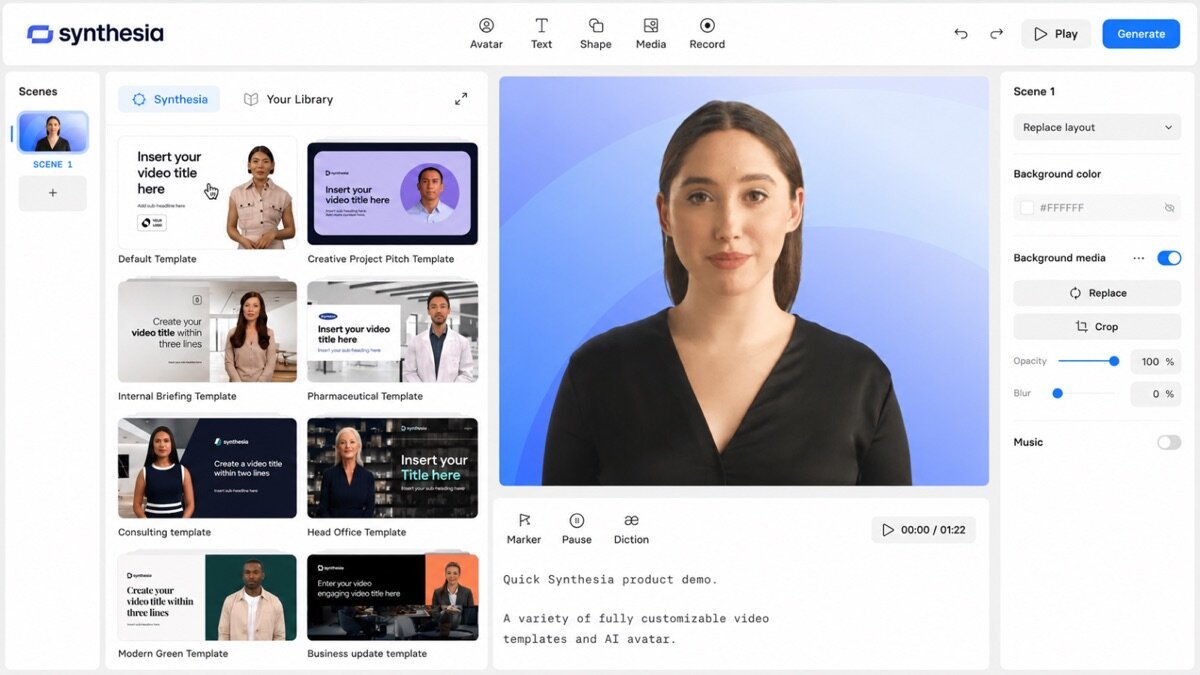
Synthesia is an AI video platform that generates videos of realistic AI avatars presenting your script, in 140+ languages, with templates and a simple editor. It targets businesses making training, onboarding, and explainer videos at scale without filming.
What Synthesia does well
AI avatars
Choose from 140+ realistic presenters (or create a custom avatar) that speak your script — no camera, crew, or studio needed.
Multilingual at scale
Produce the same video in dozens of languages instantly, ideal for global training content.
Template-driven editor
Slide-and-script templates make producing polished corporate video fast for non-editors.
Where it falls short
Avatars, while good, can still read as slightly artificial for emotional storytelling, and it is priced for business rather than hobbyists. It is not for cinematic or footage-based video.
Synthesia hands-on
For an explainer, Synthesia turned a script into a polished presenter video in minutes — something that would normally need filming. The avatar was convincing for corporate use, if not for emotive storytelling. For training content without a camera, it is excellent.
How Synthesia scored on our rubric
Synthesia pricing
Synthesia has a limited free plan and paid plans from around $29/month, scaling video minutes and features. For businesses replacing filmed training video, the savings make it strong value.
Who should (and shouldn’t) use Synthesia
Buy it if you make training, onboarding, or explainer videos and want an AI presenter without filming.
Skip it if you need footage-based or emotive storytelling — Pictory or a real editor fit better.
Synthesia alternatives
Full ranking: best AI video tools.
What’s new in Synthesia for 2026
Synthesia’s avatars have grown noticeably more realistic and expressive, custom avatars are easier to create, and it now supports 140+ languages with better lip-sync. Additions like screen recording, an AI video assistant, and brand kits push it toward a fuller video platform, while keeping its core promise: presenter videos from a script, no camera required.
Getting the most out of Synthesia
- Use it for training, onboarding, and explainers rather than cinematic video.
- Pick one avatar per series for a consistent presenter.
- Start from templates to produce polished video fast.
- Generate the same video in multiple languages for global teams.
- Keep scripts clear and conversational for the most natural delivery.
Synthesia in practice: an explainer video
We turned a script into a presenter-led explainer in minutes — pick an avatar, paste the script, add slides, done — no filming, crew, or studio. The avatar was convincing for corporate use, and generating a second language version was a couple of clicks. It is not for emotive storytelling, but for training and explainer content that would otherwise need a shoot, the time and cost savings are dramatic.
Synthesia for different use cases
- Training & onboarding: Presenter videos at scale without filming.
- Corporate comms: Consistent internal and external messaging.
- Product explainers: Clear, templated walkthroughs.
- Multilingual video: The same content in 140+ languages.
How Synthesia compares
| Tool | Best for | Starts at | Our score |
|---|---|---|---|
| Synthesia | Avatar video | $29/mo | 8.7 |
| HeyGen | Avatars + cloning | $29/mo | 8.5 |
| Descript | Editing talking video | $16/mo | 9.0 |
Is Synthesia worth it?
At around $29/month, Synthesia is priced for business, and that is where it pays off — replacing filmed training and explainer video with something you can update in minutes saves far more than the subscription. For a solo creator making the occasional video it is less compelling; its value scales with how much presenter-style content you produce.
Synthesia FAQ
The verdict
Synthesia is the best pick for avatar-presenter videos, especially training and corporate content. Avatars are convincing for business use, and it removes filming entirely. We score it 8.7 out of 10.