
Score breakdown
Updated Aug 28, 2026Adobe Firefly takes a different angle: images trained on licensed and public-domain content, marketed as commercially safe, and built right into Photoshop. For professionals, that matters. We tested it.
What is Adobe Firefly?
Adobe Firefly is Adobe AI image generator, trained on Adobe Stock and licensed/public-domain content so output is designed to be commercially safe. It powers features like Photoshop Generative Fill and is available standalone and across Creative Cloud. It suits designers and businesses wary of copyright risk.
What Adobe Firefly does well
Commercially safe
Trained on licensed and public-domain data, Firefly is positioned for commercial use with lower copyright risk — its key selling point for businesses.
Adobe integration
Generative Fill and other features live inside Photoshop and Creative Cloud, fitting existing pro workflows.
Solid, controllable output
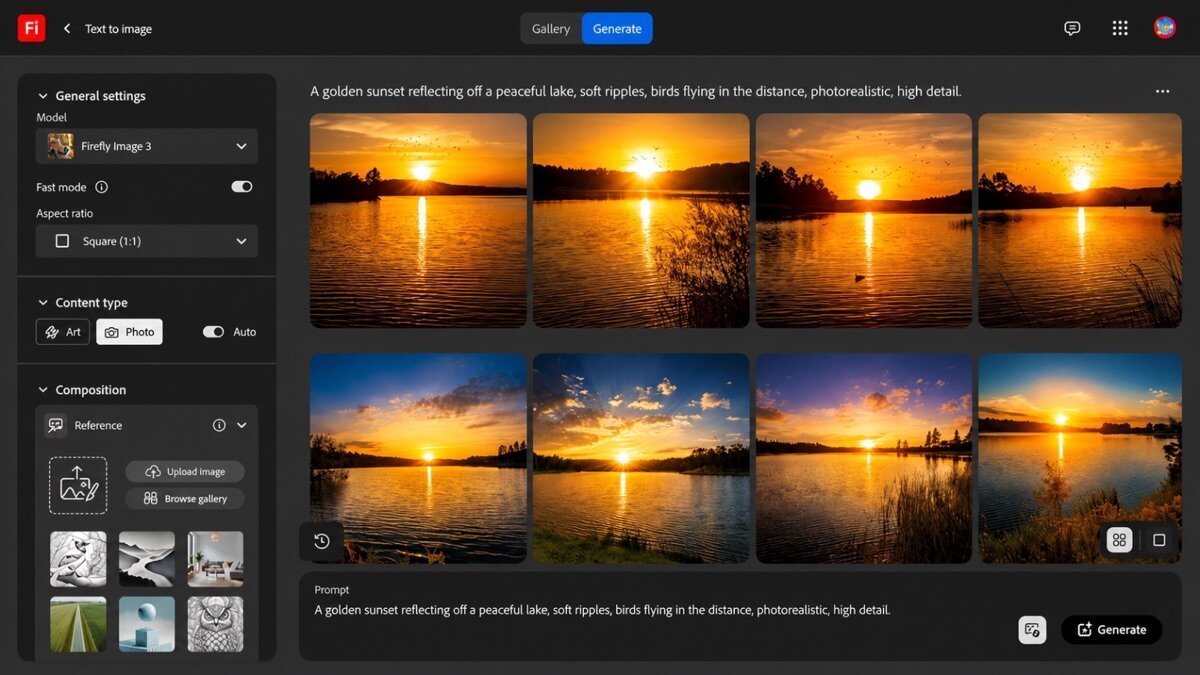
Good image quality with useful style and structure controls, plus text effects.
Where it falls short
Pure artistic quality trails Midjourney, and the best experience assumes you are in the Adobe ecosystem. Standalone, it is good but not the most exciting generator.
Adobe Firefly hands-on
Generative Fill in Photoshop was the highlight — extending and editing images seamlessly inside a pro workflow. Standalone generations were solid, if less striking than Midjourney. For designers who need commercial safety and Adobe integration, Firefly is the sensible choice.
How Adobe Firefly scored on our rubric
Adobe Firefly pricing
Firefly has a free allowance and paid plans from around $10/month, plus it is bundled into Creative Cloud subscriptions. If you already use Adobe apps, it is excellent value; standalone, it is fair.
Who should (and shouldn’t) use Adobe Firefly
Buy it if you need commercially-safe images or already work in Photoshop and Creative Cloud.
Skip it if you want the most striking art or are not in the Adobe ecosystem — Midjourney or Leonardo.
Adobe Firefly alternatives
Working on e-commerce product shots rather than general art? See our Rewarx Studio review — AI product photography, mockups and model shots built for Etsy, Amazon and Shopify sellers.
Full ranking: best AI image generators.
What’s new in Adobe Firefly for 2026
Firefly has grown into a suite. Adobe added a Firefly Video model, structure and style reference controls for far more precise output, and stronger generative fill and expand — all while keeping its commercial-safety positioning. Integration with Photoshop and Express is deeper than ever, and content credentials are attached to output, which matters for professional and regulated work. For Adobe users, it increasingly feels native rather than bolted on.
Getting the most out of Adobe Firefly
- Use Generative Fill and Expand inside Photoshop rather than the standalone app for real edits.
- Apply structure and style references to control composition and look precisely.
- Lean on its commercial-safety training for client and brand work.
- Combine with Express and other Creative Cloud apps for a full workflow.
- Check the attached content credentials when provenance matters.
Adobe Firefly for different use cases
- Commercial & client work: Its licensed training data lowers copyright risk for paid projects.
- Photoshop editing: Generative Fill and Expand for retouching and extending real photos.
- Marketing assets: On-brand images and text effects inside a familiar toolset.
- Stock-style imagery: Clean, safe visuals for decks, sites, and campaigns.
Is Adobe Firefly worth it?
Firefly has a free credit allowance and paid plans from around $10/month, and it is bundled into Creative Cloud subscriptions. If you already pay for Adobe apps, it is effectively included and excellent value; as a standalone generator it is good but not the most exciting, so its worth scales with how much you live in the Adobe ecosystem.
Adobe Firefly in practice: Generative Fill
The standout was using Generative Fill inside Photoshop — extending a background and removing an object seamlessly, right in a pro workflow, no round-trip to another app. Standalone generations were solid if less striking than Midjourney. For a designer who lives in Creative Cloud and needs commercially-safe output, that integration and peace of mind were worth more than raw artistry.
How Adobe Firefly compares
| Tool | Best for | Starts at | Our score |
|---|---|---|---|
| Adobe Firefly | Commercial safety | $10/mo | 8.3 |
| Midjourney | Artistic quality | $10/mo | 9.0 |
| Leonardo AI | Control + free tier | $12/mo | 8.6 |
Adobe Firefly FAQ
The verdict
Adobe Firefly is the best pick for commercially-safe images and anyone working in Photoshop and Creative Cloud. It is not the artistic leader, but for pro workflows and copyright peace of mind it is the sensible choice. We score it 8.3 out of 10.