
Score breakdown
Updated Aug 28, 2026Murf pairs polished AI voices with a full studio workflow for producing voiceovers — the kind you would use for explainer videos, e-learning, and presentations. Most AI voice tools stop at generating a clip; Murf is built to help you produce a finished, synced voiceover. We spent time with it on real narrated content to see where that studio-first approach pays off and where it does not.
What is Murf?
Murf is an AI voiceover platform built around a studio interface. Instead of just typing text and downloading an MP3, you generate narration, sync it to video or slides on a timeline, fine-tune pitch, emphasis and pauses, and layer in music. It is aimed at marketers, trainers, course creators, and teams who produce polished voiceovers regularly rather than one-off clips.
Voices, languages and realism
Murf offers a large library of professional voices spanning many languages and accents, with distinct speaking styles — conversational, promotional, newscast, and more — so you can match tone to context. Its newer generation of voices closes much of the naturalness gap that older AI narration had, with more believable intonation and rhythm. On pure, raw realism the very best ElevenLabs voices still edge ahead, but for produced, paced narration the difference narrows quickly once you use Murf’s emphasis and pause controls to direct the read.
What Murf does well
Studio workflow
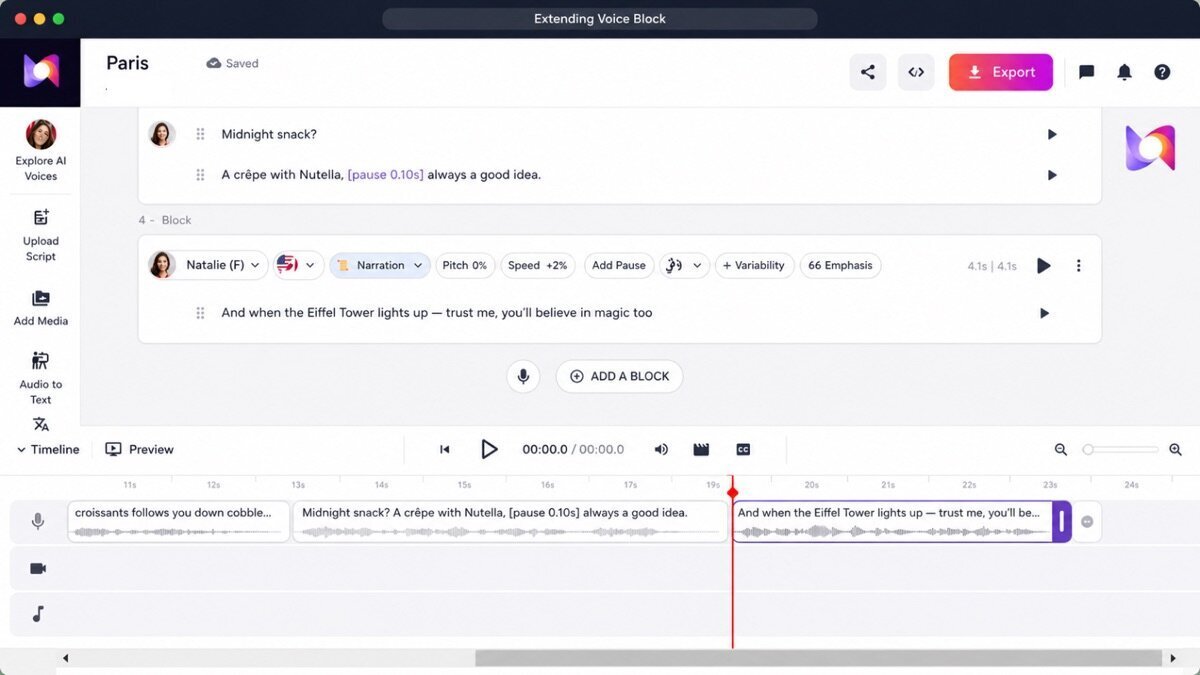
A timeline-style editor lets you sync voice to visuals, adjust emphasis, and assemble a complete voiceover in one place — far more production-focused than pure text-to-speech. This is the single feature that sets Murf apart: you are editing a voiceover, not just generating audio.
Large voice library
A wide range of professional voices and accents across dozens of languages, with multiple styles per voice so the same narrator can sound upbeat for an ad or measured for a training module.
Video and presentation sync
Built-in tools align narration with slides and video, which makes Murf genuinely strong for training, explainer, and presentation content where pacing has to match what is on screen.
Emphasis and pacing controls
Per-block control over pitch, speed, emphasis, and pauses lets you direct a performance rather than accept a flat, robotic read — the biggest lever you have on sounding professional, and something bare TTS tools rarely offer.
Setting up your first voiceover
In practice the flow is straightforward once it clicks: paste your script, split it into blocks (one per slide or scene), pick a voice, then walk down the timeline adjusting emphasis and pauses block by block. You drop your slides or video onto the same timeline and nudge each narration block until it lines up with the visuals. The first project takes a little exploring; by the second, it is fast — and far quicker than recording, re-recording, and editing a human read.
Where it falls short
Raw voice realism trails the very best ElevenLabs voices slightly. The studio’s power comes with a mild learning curve — if all you need is a five-second clip, it is more tool than the job requires. Because you are paying for a production suite, it costs more than a bare text-to-speech generator. Longer passages can take a moment to render, and dialing in a truly natural read still takes manual emphasis work rather than being perfect on the first pass.
Murf hands-on
For a narrated explainer, Murf’s studio made syncing voice to slides genuinely easy — a workflow ElevenLabs simply does not offer. We dropped the script in block by block, aligned each line to a slide on the timeline, and adjusted emphasis and pauses until the read felt human. Voice quality was good, a notch behind ElevenLabs on pure realism, but for produced, synced voiceover the studio was clearly the real value.
Voice cloning, dubbing and API
Beyond the core studio, Murf has grown into a fuller platform: voice cloning to create a custom voice, a dubbing tool for translating and re-voicing existing video, team collaboration on shared projects, and an API so teams can wire Murf into their own pipelines. There is also a voice changer that converts your own recording into a Murf voice. Together these push it well past “voice generator” into a complete voiceover system — which is really what justifies the price over basic TTS.
How Murf scored on our rubric
Murf pricing
Murf has a limited free tier and paid plans from around $19/month, with team plans above that. For a voiceover studio with sync, editing, and collaboration tools — not just raw voice generation — it is fairly priced for creators producing polished narration regularly. Check the live pricing page for current tiers before you buy.
Who should (and should not) use Murf
Buy it if you regularly produce voiceovers for video, courses, or presentations and want narration, timing, and editing in one place.
Skip it if you only need the single most realistic raw voice clip or a quick one-off — ElevenLabs is cheaper for that and edges it on realism.
Getting the most out of Murf
- Build voiceovers in the studio, syncing narration to slides or video on a timeline.
- Adjust pitch, emphasis, and pauses per block for a polished, human read.
- Use it for training and explainer content where pacing matters.
- Collaborate with teammates on shared projects.
- Try the voice changer to convert your own recording into a Murf voice.
- Reuse a cloned or chosen voice across projects for a consistent brand sound.
Murf for different use cases
- E-learning and training: Studio pacing and slide sync suit training modules.
- Explainer videos: Narration aligned to visuals without a separate editor.
- Presentations: Voice over decks directly.
- Marketing voiceover: Polished reads for ads and promos.
How Murf compares
| Tool | Best for | Starts at | Our score |
|---|---|---|---|
| Murf | Studio workflow | $19/mo | 8.5 |
| ElevenLabs | Realism and cloning | $5/mo | 9.2 |
| WellSaid Labs | Corporate voiceover | $44/mo | 8.4 |
Murf alternatives
- ElevenLabs — more realistic raw voices and strong cloning. Review.
- Play.ht — bigger voice library plus API. Review.
Full ranking: best AI voice generators.
Is Murf worth it?
At around $19/month, Murf costs more than a basic voice generator, but you are paying for a studio — timeline syncing, editing, collaboration, cloning, and dubbing — not just a voice. For creators producing narrated video and training content regularly, that workflow saves real time and keeps everything in one place. If you only need a raw voice clip, ElevenLabs is cheaper and more realistic. Choose by whether you need a voice or a voiceover.
Murf FAQ
The verdict
Murf is the best pick when you need a voiceover studio, not just a voice — syncing narration to video and slides, with cloning and dubbing on top. Realism trails ElevenLabs slightly, but the workflow is the value. We score it 8.5 out of 10.